
Stop Guessing Your Timeline: How Scope Estimation, User Stories, and a Complete Auto-Generated PRD Change Everything
Your MVP timeline isn’t wrong because you’re bad at planning. It’s wrong because you’re guessing — and guessing is what happens when your requirements aren’t structured enough to estimate against.

Last posts, we walked through turning your Codalio PRD into a polished pitch deck using Gamma. The response was clear: founders want structured outputs they can actually use downstream — not just documentation that sits in a folder.
This week, we’re going upstream. Way upstream. Into the part of the process where most MVPs quietly start to fail: scope estimation, user stories, and the question of whether your PRD is actually complete enough to build from.
Spoiler: if you’re writing user stories in a spreadsheet and estimating timelines on gut feel, it’s not.
The Real Reason Your MVP Is Over Budget
Here’s a pattern we see constantly. A founder gets a quote from a dev shop or freelancer. The quote says eight weeks. Twelve weeks later, they’re 40% over budget and the product is half-finished.
Everyone blames the developer. But the developer isn’t the problem. The scope was the problem — and the scope was the problem because nobody defined it with enough precision to estimate against.
Scope estimation isn’t a vibe. It’s a function of inputs. You need clearly defined features, broken into discrete tasks, assigned to roles, weighted by effort, and sequenced into a realistic timeline. When any of those inputs are missing, the estimate is fiction.
Most founders skip straight from “here’s my idea” to “how long will this take?” without doing the structural work in between. That’s not planning. That’s hope with a deadline attached.
Scope Estimation: What It Actually Looks Like When It’s Done Right
Real scope estimation isn’t a single number. It’s a layered breakdown that gives you — and your development team — a shared understanding of what’s being built, who’s building it, and how long each piece takes.
Here’s what that breakdown should include.
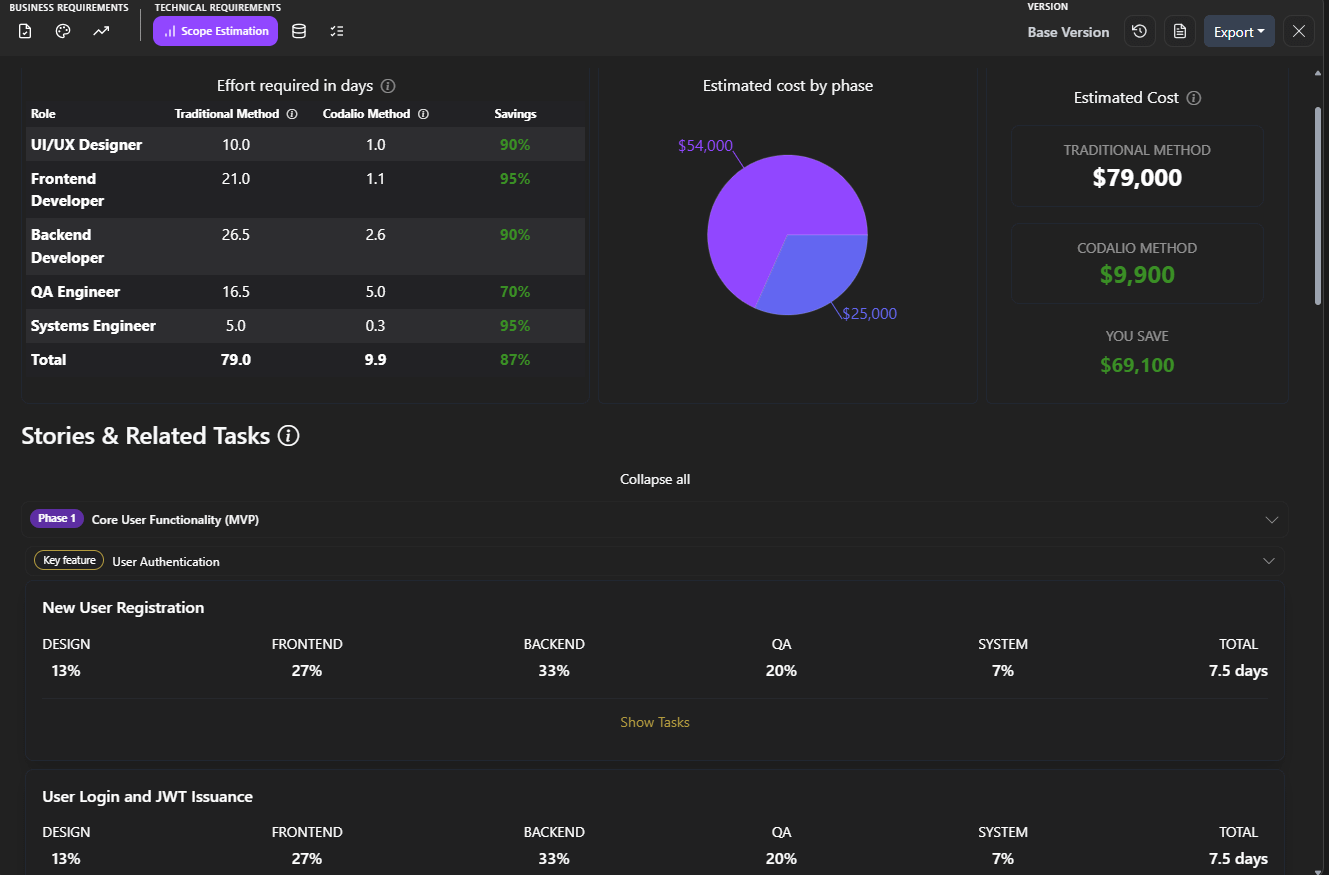
Effort by role. Not every task is a developer task. Your MVP involves frontend work, backend work, design, QA, DevOps, and project management. A proper scope estimate assigns effort to each role so you can plan resourcing — or at least understand where the bottlenecks will be.
Story points. Story points are the standard unit of effort estimation in software development. They’re relative, not absolute — a 3-point story isn’t “three days,” it’s “roughly three times the effort of a 1-point story.” This matters because it separates effort from duration. A complex integration might be 8 points but take two days. A simple but tedious data migration might be 3 points but take a week because of dependencies. Story points capture the complexity. Timeline projections layer in the calendar.
Task lists. Every user story should decompose into concrete tasks. “As a user, I can create an account” isn’t one task — it’s six: design the signup form, build the frontend component, create the API endpoint, set up the database schema, implement email verification, write the validation logic. When tasks are explicit, estimates get honest.
Timeline projections. Once you have story points and task breakdowns, you can project a realistic timeline across phases. Phase 1 might be 120 story points. If your team velocity is 30 points per sprint, that’s four two-week sprints — roughly two months. Now you have a number grounded in structure, not optimism.
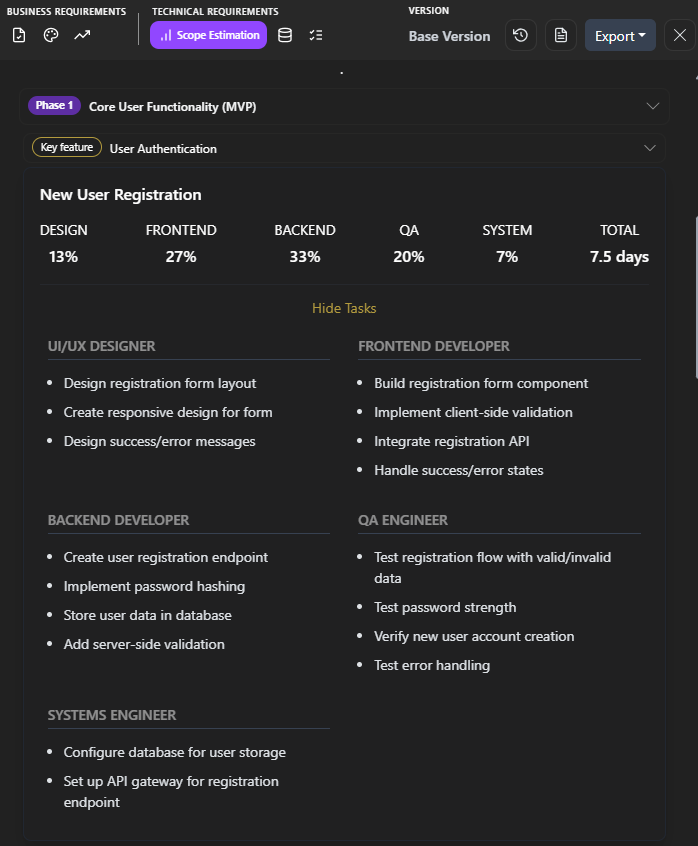
Codalio generates all of this automatically. You describe your product. The AI agents break it into phases, features, user stories, and tasks — then estimate the effort for each one. You don’t need a senior engineer or a three-week discovery sprint to get a credible scope estimate. You need your product description and ten minutes.
User Stories Done Right: The Bridge Between Business and Dev
User stories are the most misunderstood artifact in product development. Founders either skip them entirely or write them so vaguely that developers have to reverse-engineer what the product is supposed to do.
A user story isn’t a feature request. It’s a contract between the business side and the technical side. It says: here’s who the user is, here’s what they need to do, and here’s why it matters. It also says — critically — here’s how we’ll know it’s done.
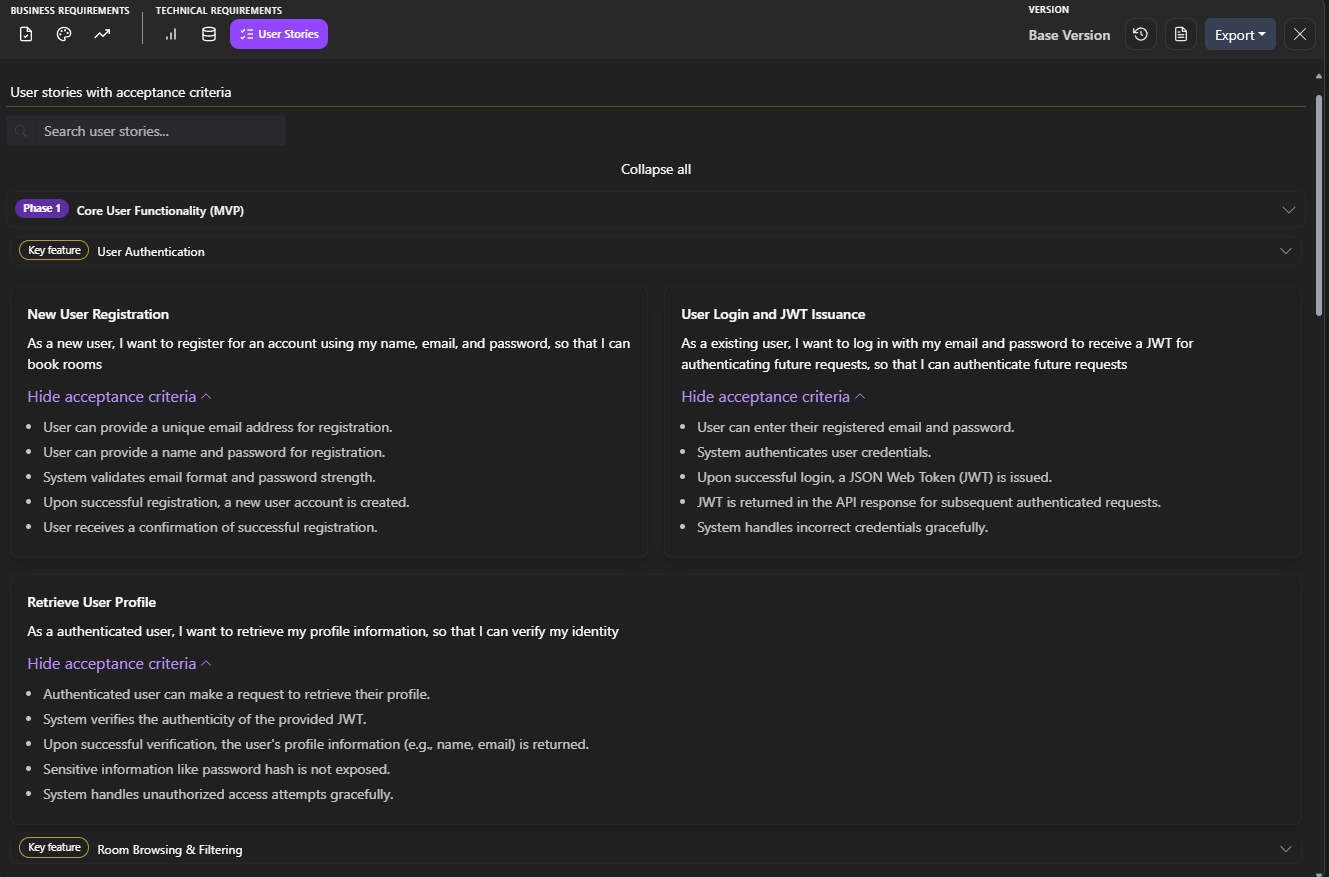
The format matters. The standard format exists for a reason: “As a [user type], I want to [action] so that [outcome].” This isn’t bureaucratic filler. The “so that” clause forces you to articulate the business value of every feature. If you can’t finish that sentence, the feature probably doesn’t belong in Phase 1.
Acceptance criteria are non-negotiable. Every user story needs acceptance criteria — specific, testable conditions that define “done.” Without them, you’re asking your developer to read your mind. “The user can search for products” is a user story. “Search returns results within 2 seconds, supports partial matches, displays product name, price, and image, and shows ‘no results found’ when the query returns empty” — that’s acceptance criteria. One tells your developer what to build. The other tells them when to stop.
Real examples bridge the gap. Here’s the difference between a user story that helps and one that doesn’t.
Unhelpful: “As a user, I want to manage my profile.” Manage how? Edit what? What fields? What happens on save? What validation? This story will generate five Slack threads and two meetings before anyone writes a line of code.
Helpful: “As a registered user, I want to update my display name, email address, and profile photo so that my account reflects my current information. Acceptance criteria: (1) User can edit display name (max 50 characters, alphanumeric and spaces only). (2) Email change triggers a verification email to the new address. (3) Profile photo accepts JPG and PNG, max 5MB, cropped to square. (4) Changes are saved only after the user clicks ‘Save,’ with a confirmation message displayed. (5) If the user navigates away without saving, a warning prompt appears.”
That second version is buildable. A developer can estimate it, implement it, and test it without a single clarification meeting. That’s what good user stories do — they eliminate ambiguity before it becomes expensive.
Codalio generates user stories in this format automatically, complete with acceptance criteria, mapped to your user personas and phased into your roadmap. The stories aren’t generic templates. They’re specific to your product, your users, and your architecture.
The Complete Auto-Generated PRD: Every Section, Handled
Here’s where we pull back and talk about the full picture.
Most PRD tools — if founders use them at all — cover the basics. Problem statement. Solution overview. Maybe some high-level features. But a PRD that’s actually useful for building software needs more than that. It needs the structural depth that turns a product vision into a development plan.
Codalio auto-generates every section of a production-grade PRD:
Elevator pitch — a concise articulation of what the product is, who it’s for, and why it matters. This isn’t just for pitch decks. It’s the alignment statement that keeps everyone — founders, developers, designers, investors — building toward the same product.
Problem statement — the pain your users experience today, the current solutions they’re limping along with, and why those solutions fail. This section grounds every feature decision. If a feature doesn’t connect back to the problem, it’s scope creep.
Solution overview — what your product does, described in terms of outcomes, not architecture. This is the section that tells a non-technical stakeholder exactly what they’re funding.
User personas — who your users are, what they need, what frustrates them, and how they’ll interact with your product. Personas aren’t marketing exercises. They’re the filter that determines which features matter and which are nice-to-haves.
User stories with acceptance criteria — the detailed, buildable descriptions of every interaction your users will have with your product, organized by phase and priority.
Scope estimation with story points and task breakdowns — the effort analysis that turns your feature list into a timeline and a budget.
Phasing strategy — what ships in Phase 1 (your MVP), what comes in Phase 2 (your growth features), and what waits for Phase 3 (your scale features). Phasing isn’t just about prioritization. It’s about capital efficiency. Every feature you defer from Phase 1 is money you don’t spend until you’ve validated that the core product works.
Technical architecture overview — the high-level system design that tells your development team (or dev shop) what they’re building on, so they can plan infrastructure before writing application code.
Every section feeds every other section. Your user stories connect to your personas. Your scope estimates connect to your phasing strategy. Your phasing strategy connects to your solution overview. It’s a coherent system, not a stack of disconnected documents.
And every section is auto-generated from a single input: your product description, in plain language.
The Complete PRD Solution Is Almost Here
We’ve been building toward something, and it’s ready.
The complete Codalio PRD — every section we’ve covered in this series, fully auto-generated, fully integrated, exportable and usable — is launching soon. One input. One workflow. Every artifact you need to go from idea to buildable plan, without hiring a product manager, a business analyst, or a senior engineer to do the scoping work for you.
We’ll have more to share in the coming weeks. If you want early access, sign up now and you’ll be first in line.
Stop Guessing. Start Estimating.
If your current “scope estimate” is a number someone made up in a meeting, you don’t have an estimate. You have a wish.
Real estimates come from structured requirements — user stories with acceptance criteria, effort breakdowns by role, story points that reflect actual complexity, and timelines grounded in task-level detail.
Codalio generates all of it. Automatically. From your product description.
Sign up for Codalio → and get scope estimates, user stories, and a complete PRD auto-generated — before you spend a dollar on development.
What’s Next
Next week, we’re going deeper into the technical architecture layer — how Codalio’s AI agents translate your business requirements into database schemas, API designs, and system architecture decisions. The translation layer that used to require a senior engineer and a whiteboard is about to get a whole lot more accessible.
Learned something valuable? Subscribe to the Codalio newsletter so you never miss a post. We break down the patterns that separate founders who ship from founders who spin.